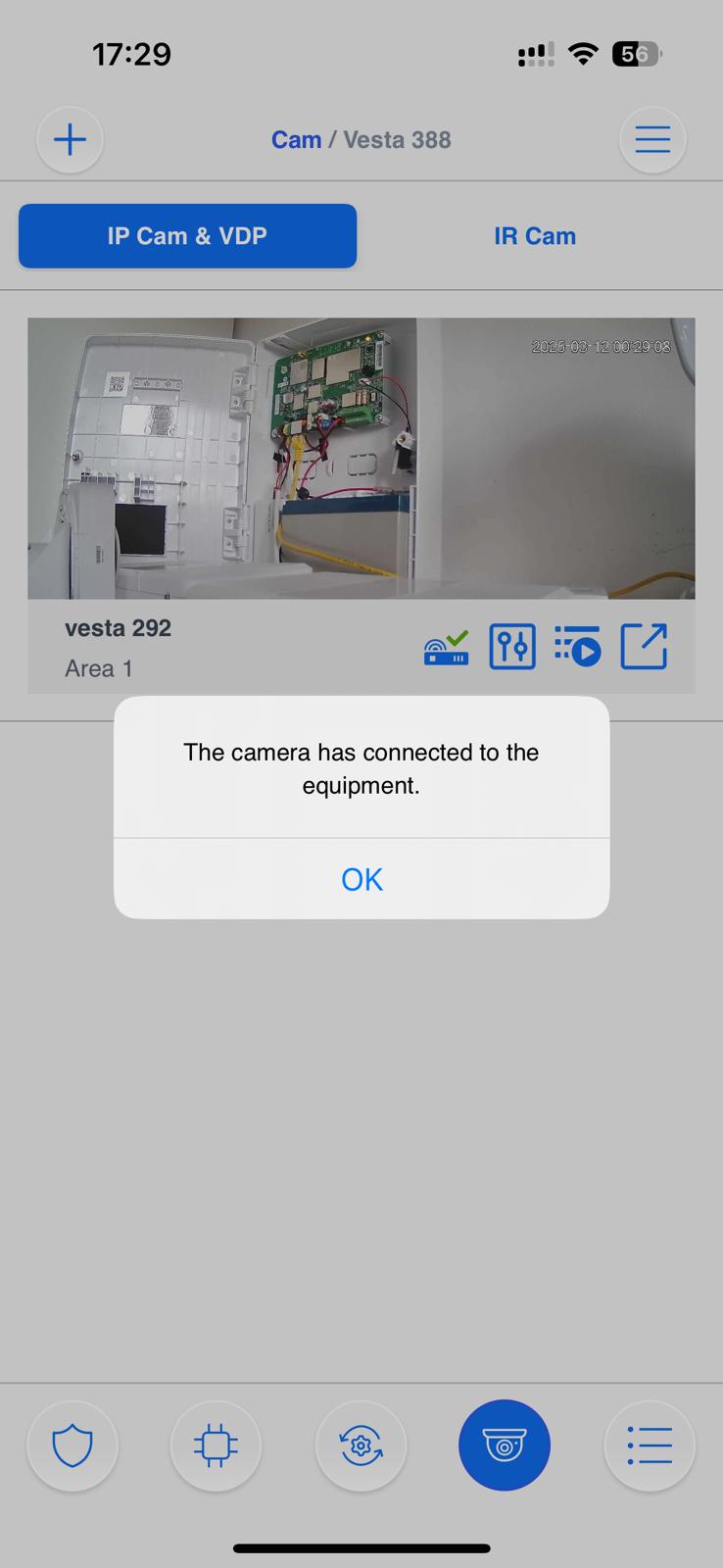
> For the complete documentation index, see [llms.txt](https://vesta-guide.gitbook.io/vesta-guide/llms.txt). Markdown versions of documentation pages are available by appending `.md` to page URLs; this page is available as [Markdown](https://vesta-guide.gitbook.io/vesta-guide/vesta-home-ip-cameras/setup-vesta-home-ip-cam.md).
# SETUP VESTA Home IP CAM
The VESTA Home series are a range of wireless security cameras designed for both indoor and outdoor use. They provide reliable video surveillance with easy installation.
{% hint style="success" %}
We will show how to add the camera Vesta-292, but this guide is valid for:
VESTA-291
VESTA-293
IPC-C32-IN-WF
IPC-A1-PTZ-WF
IPC-B32-OUT-WF
{% endhint %}
{% hint style="warning" %}
Before you start, please check the permissions for the SmartHomeSec app on your phone. The Position setting must be set to 'Always' and the Network Access setting must be set to 'ON'.
{% endhint %}
## Camera 292
#### STEP 1: Plug the power cable
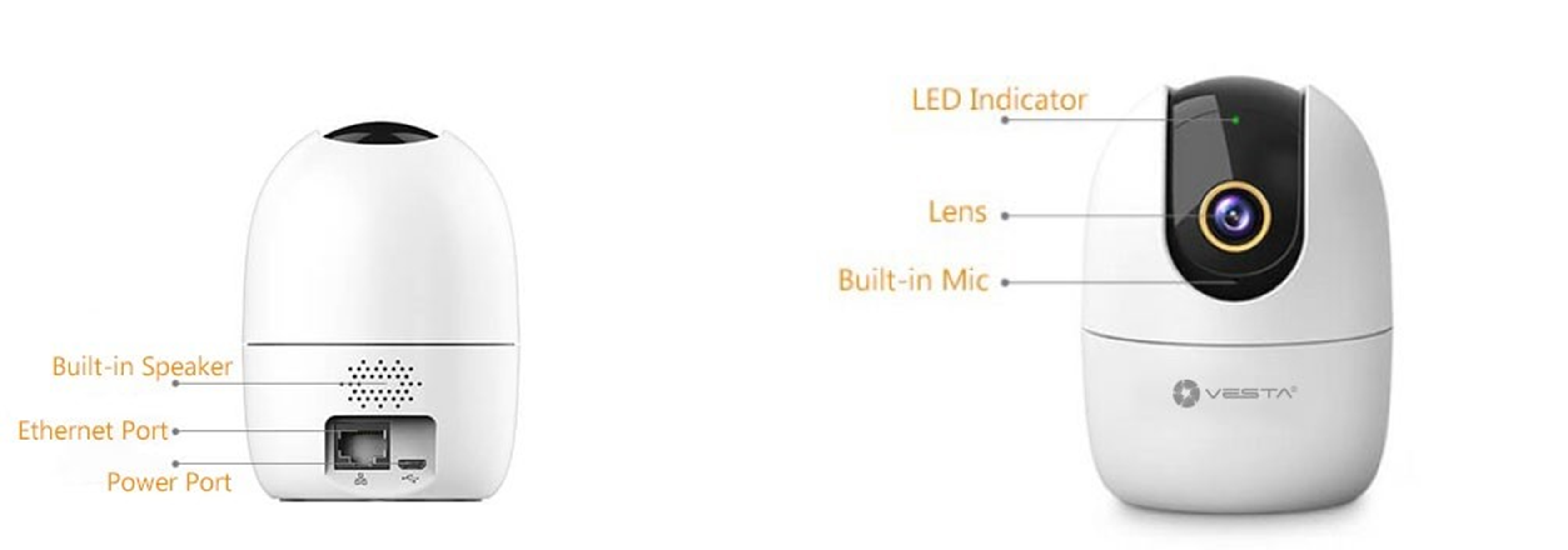
#### STEP 2: Wait for the LED to remain in solid GREEN colour for Ethernet connection or flashing GREEN in case of Wi-Fi Setup
Use the SmartHomeSec app to initialise the camera and **add** it to the system
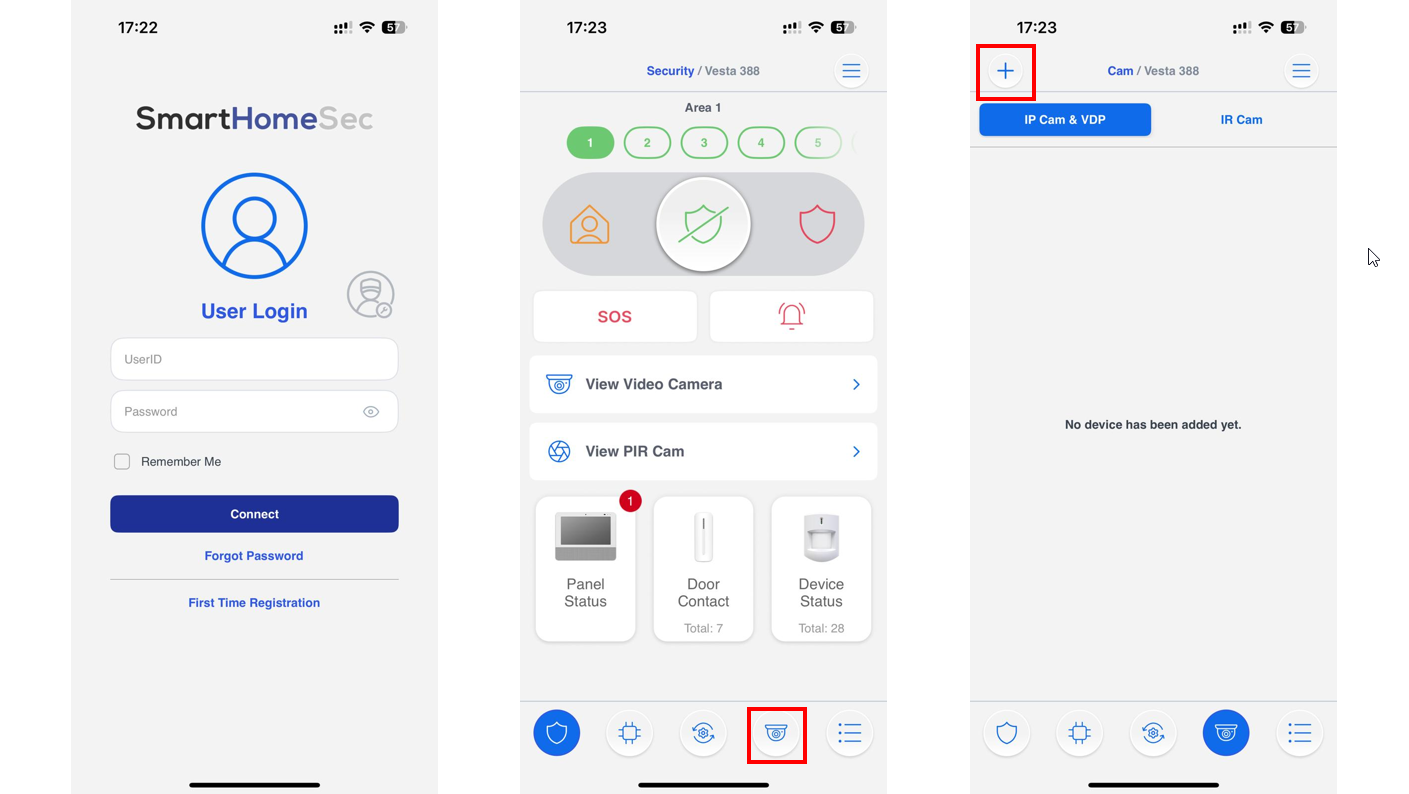
STEP 1 STEP 2 STEP 3
### STEP 1: Login as User in the SmarthomeSec App
### STEP 2: Press Camera logo
### STEP 3: Press + Icon to add a camera
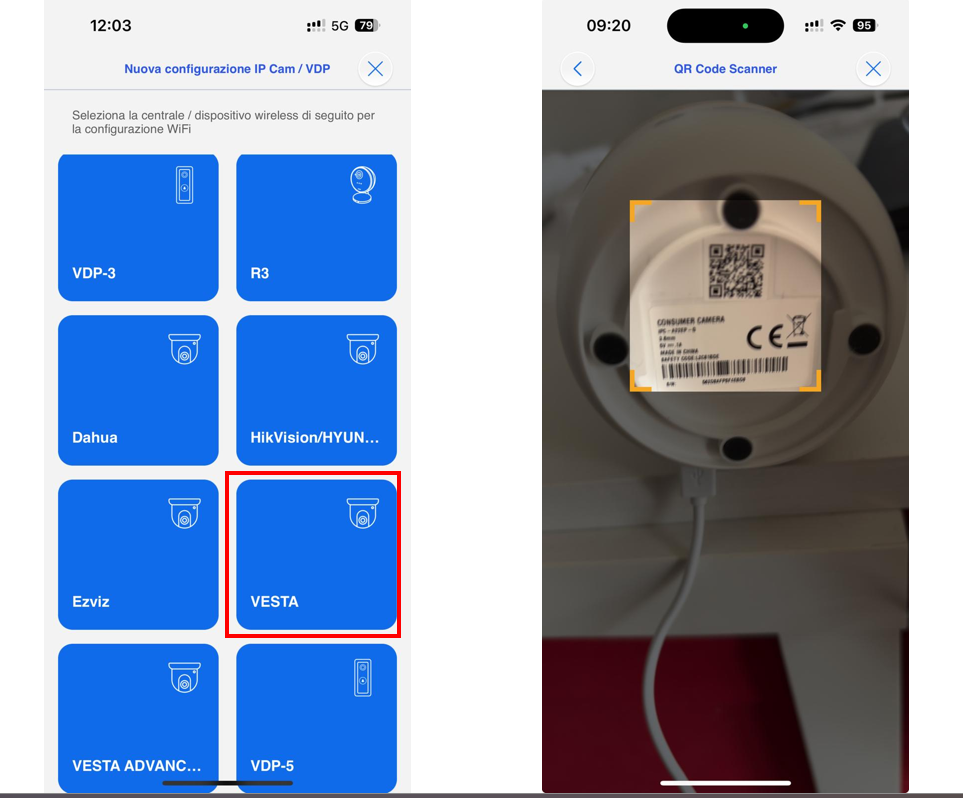
STEP 4 STEP 5
### STEP 4: Press the VESTA Home icon
### STEP 5: Scan the Camera QR code and press NEXT
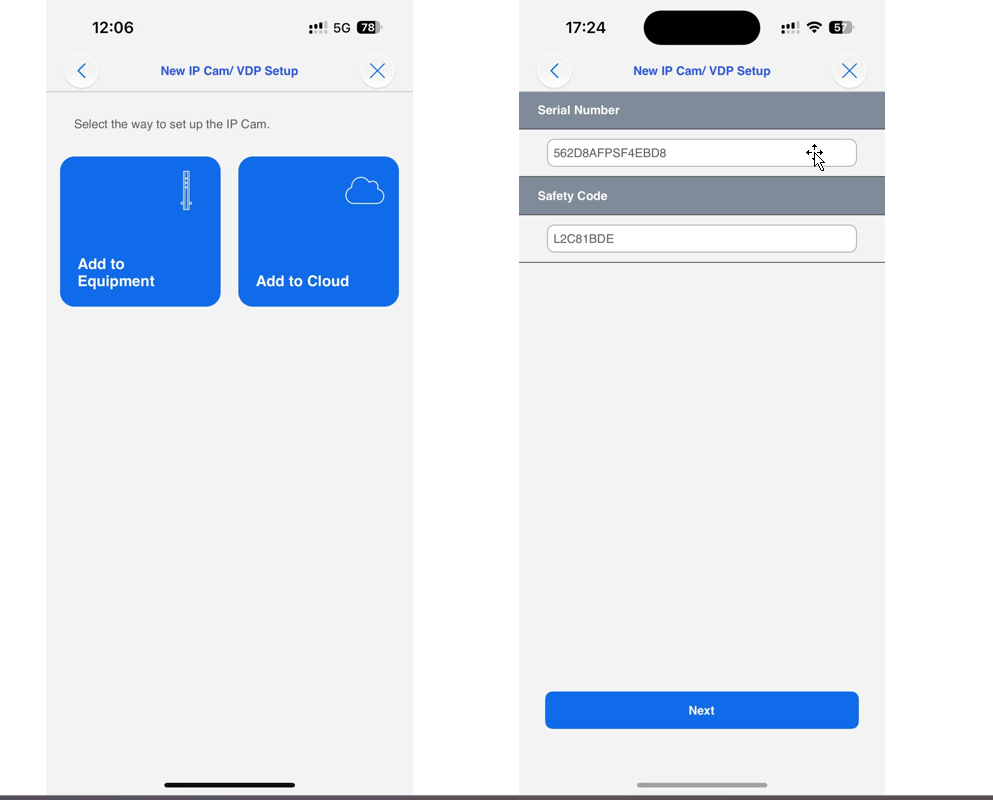
### STEP 6: Select how to add the camera:
* Add to the equipment: The camera must be installed on the same panel LAN network. In this way, the camera will be fully supported in the panel and the user app.
{% hint style="success" %}
Vantages to add to the equipment:
* The camera will be an intrusion zone in the panel, and it can generate alarms.
* SD-CARD video recording access
* Movement detection.
* PTZ control for the VESTA-292
{% endhint %}
STEP 6
* Add to the cloud: The camera will be installed using the cloud. The user will see the live video only from the user's app account.
{% hint style="success" %}
Vantages to add to the cloud:
* The camera can be installed on a different network (or at a different site).
* Users with panels connected with 4G communication only, can have cameras connected to their accounts.
{% endhint %}
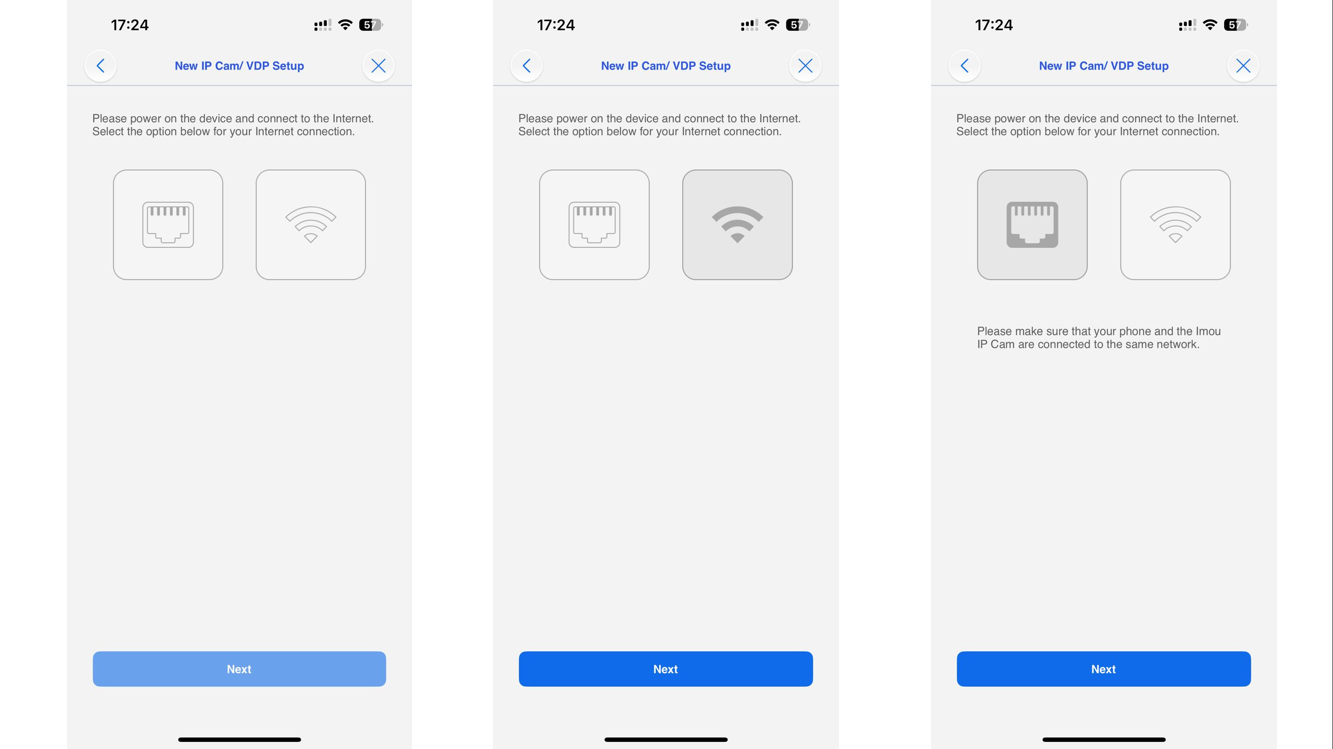
### STEP 7: Choose the communication path of the camera (Ethernet or Wi-Fi)
{% hint style="warning" %}
The camera and the panel must be on the same network, please check before proceeding
{% endhint %}
STEP 7
{% hint style="info" %}
In case of Ethernet communication, jump directly to STEP 12
{% endhint %}
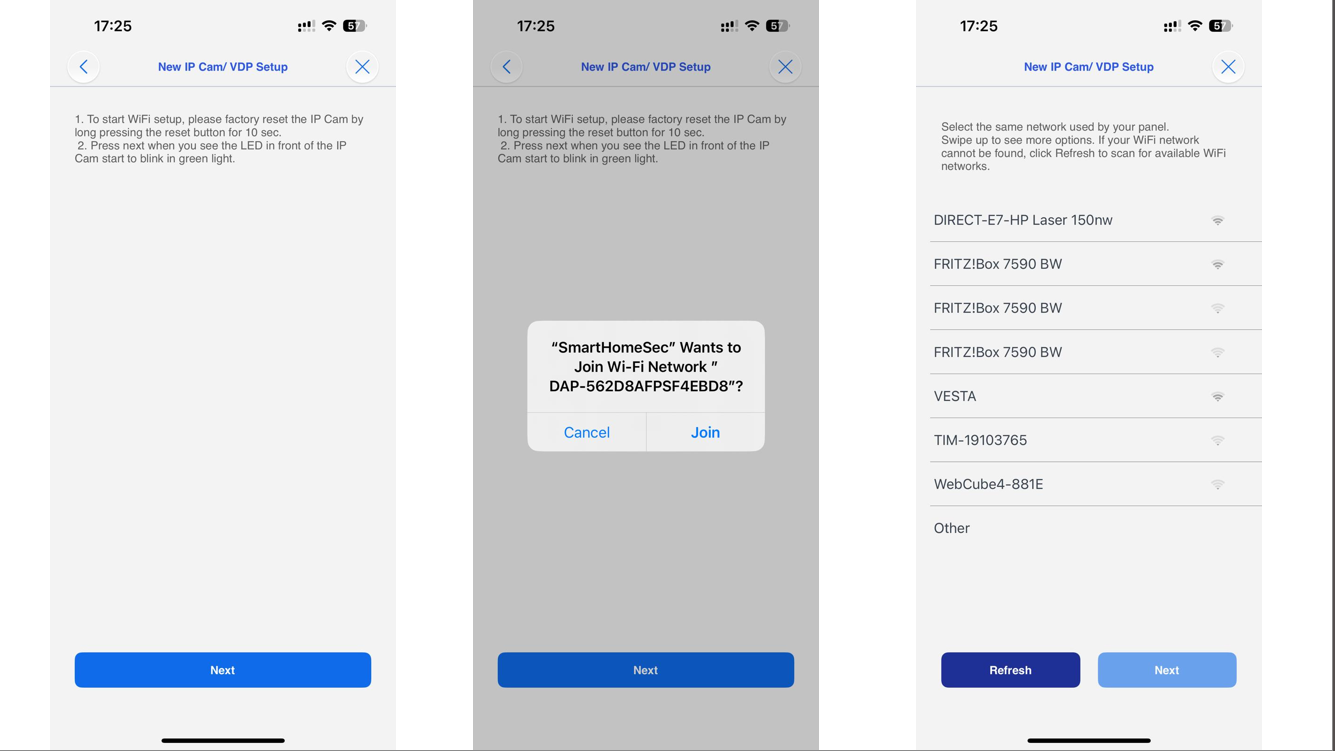
### STEP 8: Wi-Fi connection
{% hint style="warning" %}
The mobile must be connected to the Wi-Fi network that you want to connect the camera
{% endhint %}
STEP 8 STEP 9 STEP 10
{% hint style="info" %}
**If you're connecting your camera via Wi-Fi but it doesn't proceed to the IP search step, don't worry. This can happen if your mobile device temporarily lost internet connection while switching networks and didn’t reconnect properly.**
To continue:
* Check if the camera's **GREEN LED** is **solid ON** (not blinking).
* If it is, go back to the previous step and **select ETHERNET instead of Wi-Fi** — the setup should then work correctly.

{% endhint %}
### STEP 9: Connect your mobile to the camera network by pressing join
### STEP 10: Select the network and press Next
STEP 11 STEP 12 STEP 13
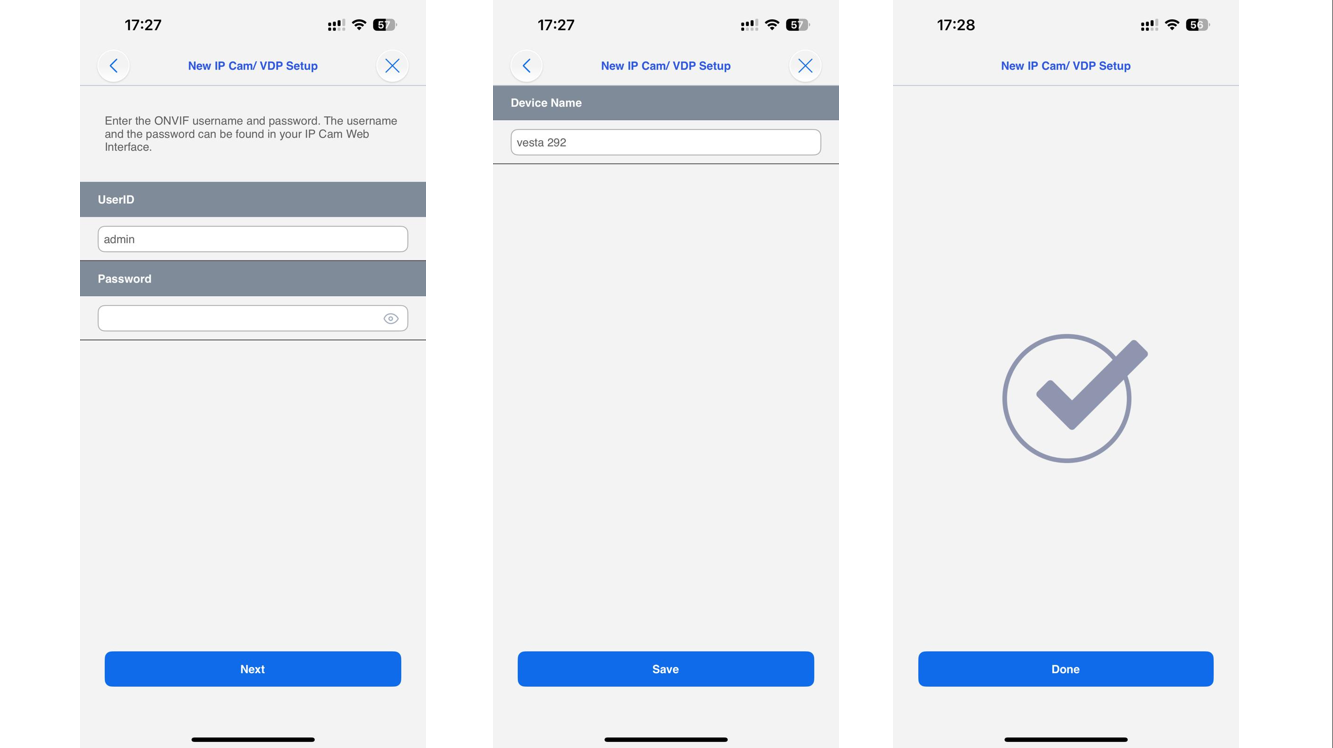
### STEP 11: Write the Wi-Fi password
### STEP 12: The app will show you the camera userID and password
STEP 12
{% hint style="warning" %}
Note:
If the password field is not automatically filled:
UserID: admin
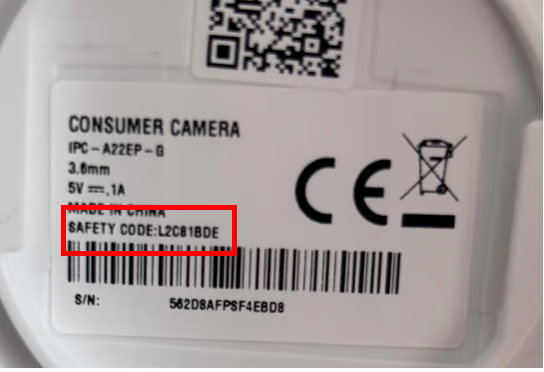
Password: (Safety code of the camera, label below)
{% endhint %}
Password
SETUP COMPLETED
***
### **How to Enable Camera Notifications When the System is Disarmed**
The **VESTA HOME / ADV cameras** allow you to receive notifications even while the system is disarmed. This can be useful if you want to stay aware of movement in certain areas without arming the entire system.
#### Steps to Configure:
1. Go to the Settings --> Device --> **Camera settings** in the app SmartHomeSec.
1\.
```
```
2. Locate the option **Image notification** as attribute **during Disarm**:
1\.
```
```
3. Enable this option on the camera.
{% hint style="warning" %}
Note: To enable notifications for images, you must arm and disarm the control panel at least once
{% endhint %}
#### What Happens Next:
* The system will stay in **alert mode** even when disarmed.
* If the camera detects activity, you will receive a **push notification**:
* *Human Detected / Motion Detected*
⚠️ **Important:** In this mode, the camera **will capture images**. You will get the push notification. You can view the photos in the panel events log.
{% hint style="success" %}
**Note:**\
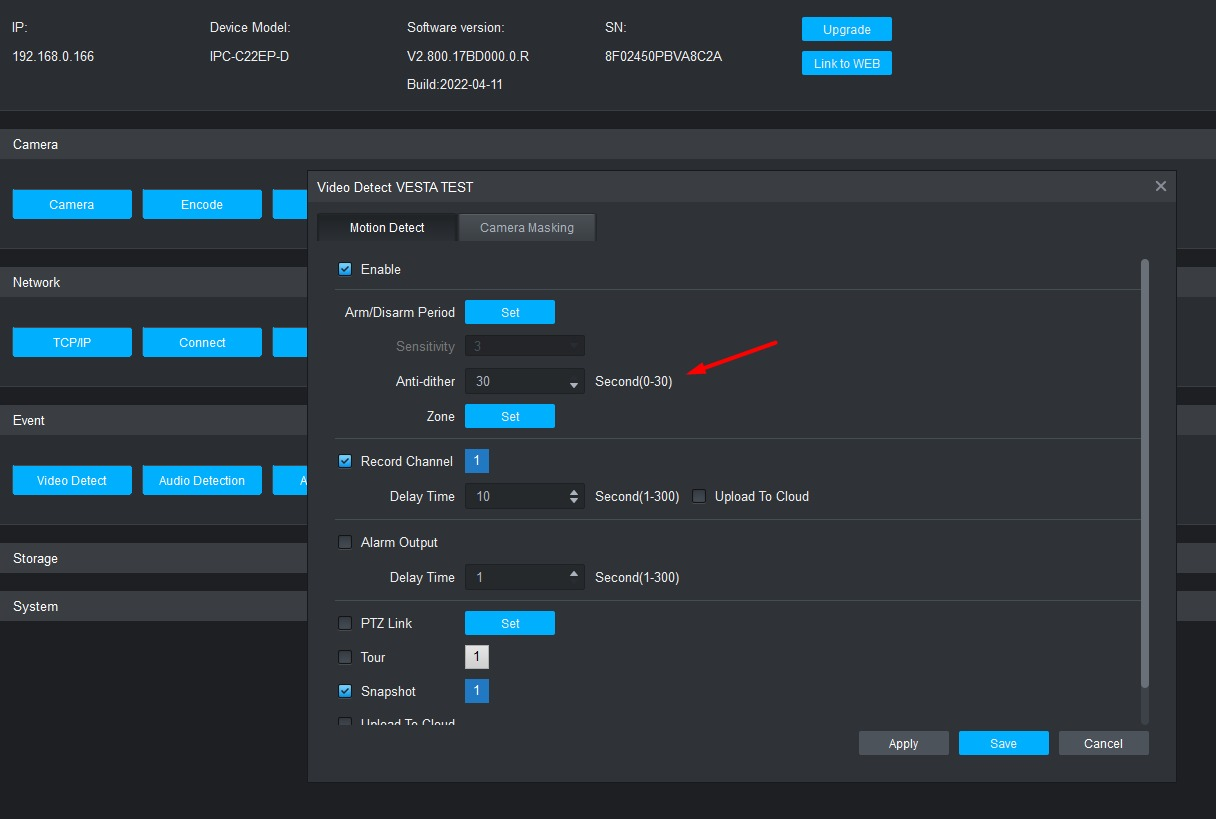
By default, **VESTA Home cameras** use a filtering system where a person must remain in the scene for **30 seconds** before an event is reported to the panel.
This behavior can be modified by adding the camera to the **SmartPSS software** and adjusting the motion detection "Anti-Dither" setting to **1 second**, allowing for almost immediate event reporting
The Anti-Dither option determines how long a movement must last in the scene to be considered as such.
{% endhint %}
{% hint style="info" %}
Additionally, between detections the camera has a **sleep time of 3 minutes**, meaning that continuous motion will only trigger one event every 3 minutes.
{% endhint %}
***
## TROUBLESHOOTING
### **I cannot find the IP of the camera on the setup steps:**
1\. Ensure that the VESTA central controller is connected to the same network as the camera.
2\. Restart the switch or router where the VESTA panel and Camera are connected.
{% hint style="success" %}
### **IP Detection Issue During Camera Setup**
Sometimes, when you reach the **IP detection step**, the panel may not find any devices during the scan. If this happens, and you have already configured the camera via **Wi-Fi**, check the following:
#### Scenario
* You used **Wi-Fi setup** as the connection method.
* The camera shows a **solid green LED**, meaning it is already connected to the Wi-Fi network.
* However, when the panel scans for IP devices, nothing appears.
#### Solution
To avoid repeating the entire setup process, do the following:
1. Go back to the step where you select the **connection method**.
2. Scan the **QR code** again.
3. Instead of selecting *Wi-Fi*, choose **Ethernet**.

#### Why?
Even though the camera is connected via Wi-Fi, selecting **Ethernet** in this step allows the panel to correctly detect the camera on the network without forcing you to reconfigure everything.
{% endhint %}
***
### **I cannot complete the setup via WIFI**
1\. Check that you have the latest firmware in the VESTA control unit.
2\. Make sure to enable the location for the SmartHomeSec APP.
3\. Make sure you give the APP permissions to connect to a WIFI network, and if it asks for connection permissions allow them.
***
### **The camera is not ready:**
1. Reset the camera to factory settings
To reset the VESTA camera: Press the button RESET located on the back and hold for 10 seconds (The camera will make a BEEP and the LED will turn red) NOTES: In the VESTA-292 model, the button is located under the optics
***
### Removing the camera from a user’s account.
To assign the camera to another customer, it must first be removed from the SHS app and then added to the new customer’s account.
\
This can be done via the user or installer account in the SHS app.