# VESTA-352

## Outdoor curtain digital detector with dual technology &#x20;

<figure><img src="/files/f0eNfwOx2RFd32EDmMUg" alt="" width="143"><figcaption></figcaption></figure>

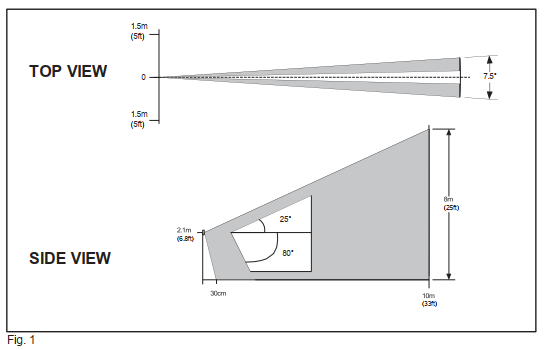
The detector has been designed to provide external perimeter protection, creating a vertical barrier with multiple beams, which detects the presence of an intruder before he breaks into the internal environments, with a maximum range of 9 m.

Robust IP54 enclosure.

LED

1. Yellow colour, Pir alarm.
2. Blue colour, Microwave alarm
3. Red colour, Rele alarm

CONFIGURATION

<figure><img src="/files/0pJoThLmgQIqcR5NjK2Y" alt=""><figcaption></figcaption></figure>

<table><thead><tr><th width="126" align="center">DIP SWITCH</th><th width="64"></th><th></th></tr></thead><tbody><tr><td align="center">SWITCH POSITION</td><td> </td><td>FUNCTION</td></tr><tr><td align="center">1</td><td>OFF</td><td>Minimum infrared sensitivity</td></tr><tr><td align="center">2</td><td>OFF</td><td> </td></tr><tr><td align="center">1</td><td>ON</td><td>Medium infrared sensitivity </td></tr><tr><td align="center">2</td><td>OFF</td><td> </td></tr><tr><td align="center">1</td><td>OFF</td><td>Medium/high infrared sensitivity</td></tr><tr><td align="center">2</td><td>ON</td><td> </td></tr><tr><td align="center">1</td><td>ON</td><td>High infrared sensitivity</td></tr><tr><td align="center">2</td><td>ON</td><td> </td></tr><tr><td align="center">3</td><td>OFF</td><td>Normal microwave sensitivity</td></tr><tr><td align="center"> </td><td>ON</td><td> High microwave sensitivity</td></tr><tr><td align="center">4</td><td>OFF</td><td>Anti-blinding OFF</td></tr><tr><td align="center"> </td><td>ON</td><td>Anti-blinding ON</td></tr><tr><td align="center">5</td><td>OFF</td><td>Battery saver off</td></tr><tr><td align="center"> </td><td>ON</td><td>Battery saver active </td></tr><tr><td align="center">6</td><td>OFF</td><td>Low anti-blinding sensitivity </td></tr><tr><td align="center"> </td><td>ON</td><td>High anti-blinding sensitivity </td></tr><tr><td align="center">7</td><td>OFF</td><td>LED OFF</td></tr><tr><td align="center"> </td><td>ON</td><td>LED ON</td></tr></tbody></table>

INSTALLATION

For correct installation, the sensor must be mounted outside at a maximum height of 2.5m from the ground, perpendicular to the ground plane.

1. Choose the position of the   &#x20;detector
2. Fix the bottom of the detector to the wall, drilling the holes provided, checking that it is perfectly perpendicular to the ground
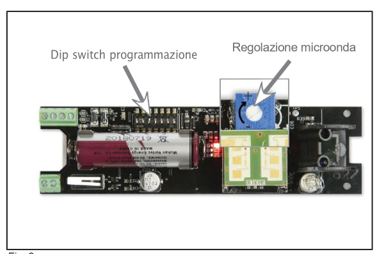
3. Set the Dip Switches according to the table

{% hint style="warning" %}
Note:

The Dip Switch setting must be done before powering up.
{% endhint %}

{% hint style="success" %}
Note:

If necessary, it is possible to reduce the sensitivity of the microwave using the relevant trimmer.
{% endhint %}

4. Close the sensor by hooking the lower part and screwing the upper screw.
5. During the first two minutes, the sensor self-calibrates the anti-blinding if   &#x20;this is active

<figure><img src="/files/9rGoRjKBbHq8lu7YDG0q" alt=""><figcaption></figcaption></figure>

{% hint style="warning" %}
Note:

Once the verification and calibration operations are completed, deactivate the LED signal (Dip 7 OFF) to avoid reducing battery life.\
All the settings must be made with the device disconnected from the power supply.
{% endhint %}

INSTALLATION TIPS

Avoid fixing the detector in places completely exposed to atmospheric agents (wind, rain, snow, etc.)

Avoid direct sunlight or reflected light on shiny surfaces

Do not install the detector near plants, bushes or air jets from air conditioners.


---

# Agent Instructions: Querying This Documentation

If you need additional information that is not directly available in this page, you can query the documentation dynamically by asking a question.

Perform an HTTP GET request on the current page URL with the `ask` query parameter:

```
GET https://vesta-guide.gitbook.io/vesta-guide/vesta-352.md?ask=<question>
```

The question should be specific, self-contained, and written in natural language.
The response will contain a direct answer to the question and relevant excerpts and sources from the documentation.

Use this mechanism when the answer is not explicitly present in the current page, you need clarification or additional context, or you want to retrieve related documentation sections.