> For the complete documentation index, see [llms.txt](https://vesta-guide.gitbook.io/vesta-guide/llms.txt). Markdown versions of documentation pages are available by appending `.md` to page URLs; this page is available as [Markdown](https://vesta-guide.gitbook.io/vesta-guide/vesta-281.md).
# VESTA-281
FS-mmW-3
## Vesta Fall Sensor
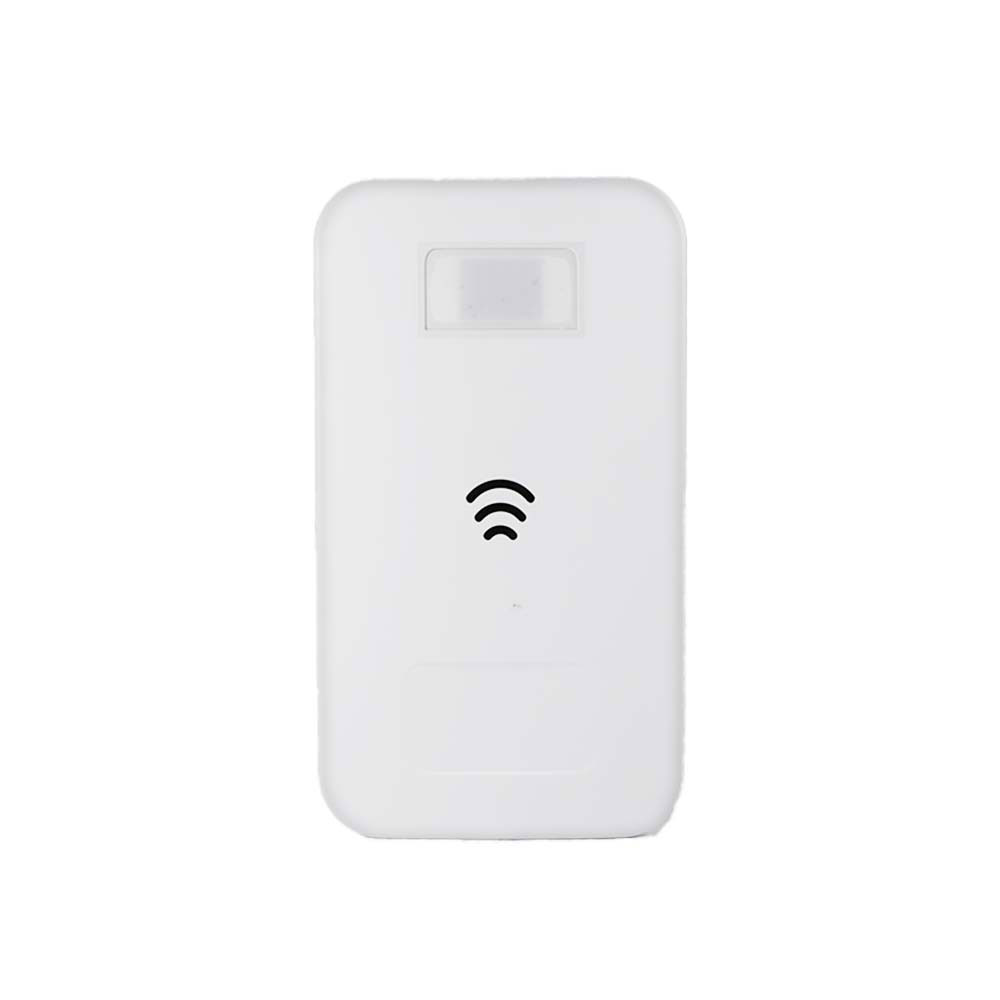
The FS-mmW-3 is a fall detection sensor featuring mmWave Technology. Unlike classic fall detection solutions that rely on a wearable device to detect the fall itself, the mmWave fall sensor is a non-wearable device that can immediately detect a fallen person as he/she changes from a standing position to a lying position.
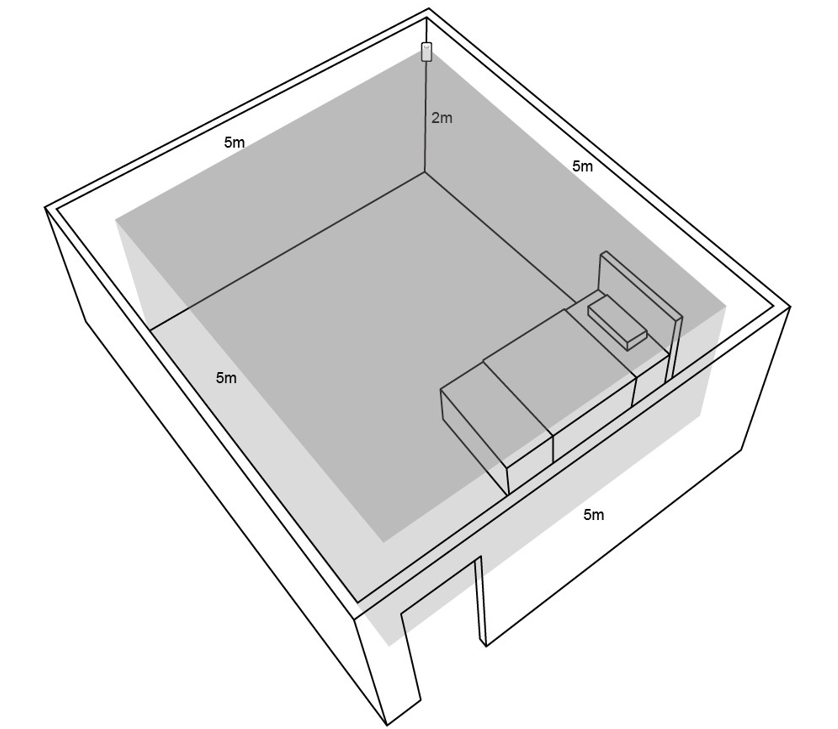
The fall sensor is designed to be installed in corners of each frequently visited place such as bathroom, bedroom, porch steps or anywhere people may easily fall down. It gives a typical detection area of 5m x 5m when mounted at a height of 2 meters above the ground. There are 2 detection modes (< 170 cm; ≥ 170 cm) for FS-mmW-3, which can be programmed on the Control Panel.
## Identifying the Parts
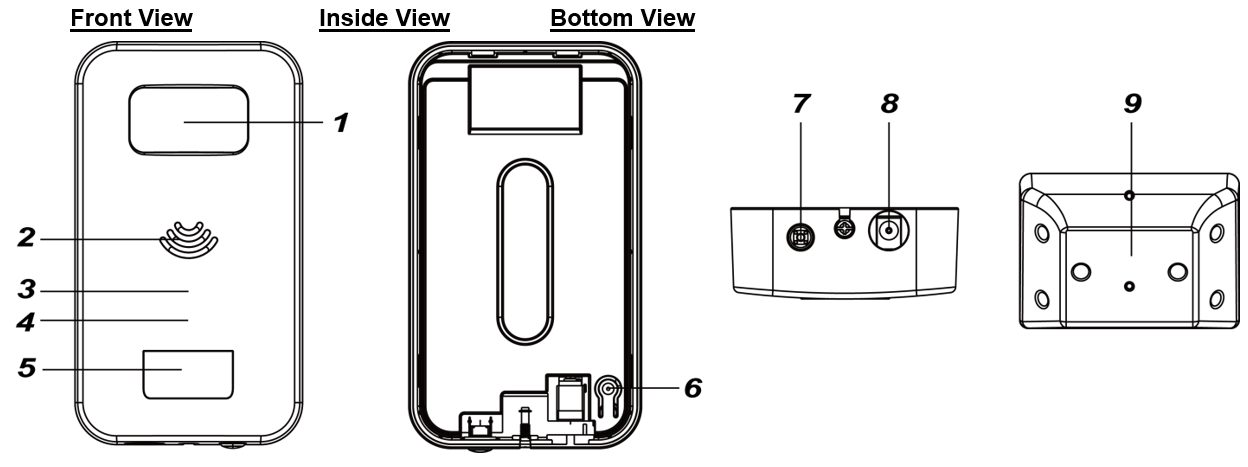
### 1. mmWave sensor
### 2. Buzzer
### 3. Green / Red LED
#### Green LED
\- ON: AC power is connected.
\- Flashes once every second: AC power fails.
\- Flashes once every 3 seconds: Low Battery status. - Flashes once every 5 seconds: Battery exhausted.
#### Red LED
\- 2 Quick Flashes when powered on: The fall sensor is in Mode A.
\- 4 Quick Flashes when powered on: The fall sensor is in Mode B.
\- Flashes once every second for 15 seconds: After mmWave detects a movement.
\- ON: Fall Alarm.
### 4. Blue LED
\- ON for 15 seconds: After IR sensor detects a movement
\- Quick Flash: Fall Alarm Reporting.
When the Blue LED lights up, the Green LED will turn off.
### 5. IR Sensor
The sensor is intended to detect movement.
### 6. Reset Button
After plugging in the 5V 2A adaptor, press the reset button once to reset the device.
### 7. Learn Button
\- Press the Learn Button once to send a learn code to the Control Panel.
\- Press and hold the Learn Button for 8 seconds to cancel the alarm.
\- Press and hold the Learn Button for 8 seconds to receive sensitivity level data from the Control Panel.
### 8. DC Jack
Connect to a 5V 2A adaptor.
### 9. Mounting Bracket
## Power Supply
* A DC 5V 2A output Power Adapter is generally used to power the device. Be sure only to use an adapter with the appropriate AC voltage rating to prevent component damage.
* In addition to the adapter, there is a rechargeable battery inside the fall detection sensor, which serves as a back-up power in case of a power failure. When the Power Adapter is unplugged, the fall detection sensor will be powered by the rechargeable battery and continue operation.
* The fall detection sensor can detect the battery voltage. When the battery voltage is low, FS-mmW-3 will transmit low-battery signals, and the Green LED will flash once every 3 seconds to indicate the low battery status.
* When the battery is exhausted, FS-mmW-3 will stop all functions, the Green LED will flash once every 5 seconds.
## Supervisory Signal
* The fall detection sensor will automatically transmit a supervisory signal to the Control Panel every 24 hours. If low battery is detected, the supervisory signal will be sent to the Control Panel every 12 hours.
## IR Detection for Power Conservation
* The fall detection sensor features IR detection function for power conservation.
* During normal mode, the mmWave sensor remains off for power saving. After the IR sensor detects a movement, the mmWave sensor will be activated for 15 seconds. The Blue LED will turn steady on after a movement detection. The Red LED will flash once every second after a movement detection. Any further movement detected when the mmWave sensor is active will extend the mmWave active period by another 15 seconds.
* The mmWave sensor will turn off when the 15-second active period expires without any further movement having been detected. The Red LED and Blue LED will turn off.
## Fall Detection
* The fall detection sensor can detect a fallen person as he/she changes from a standing position to a lying position. The sensor will emit a long beep and transmit an alarm signal to the Control Panel within 15 seconds after the person has fallen and remained lying on the ground.
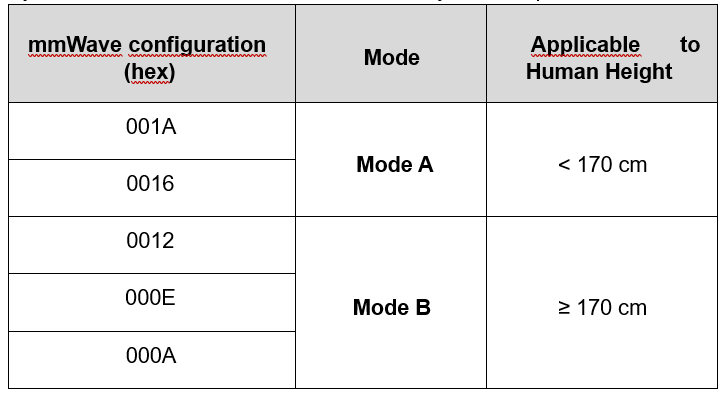
* Two detection modes are available for selection based on the height of the user. Mode A (default mode) is applicable to user with height less than 170 cm; Mode B is applicable to user with height more than or equal to 170 cm. Please refer to the *Detection Mode Selection* section for details.
## Getting Started – Learning the Fall Detection Sensor into the Control Panel
* Unscrew the bottom fixing screw of the sensor and remove the back cover.
* Connect the power adaptor and press the reset button once to reset the device.
* Re-place the back cover and fasten the bottom fixing screw.
* Put the Control Panel into learning mode (refer to the Control Panel’s manual for details).
* Press the learn button once. The device will emit one short beep.
* If the Control Panel receives the learning signal, it will display the information accordingly. Refer to the Control Panel’s manual to complete the learn-in process.
* After the fall sensor is successfully learned in, you can select detection mode on the Control Panel webpage. Please see the section below for details.
## Detection Mode Selection
* Two Detection Modes are selectable from the Control Panel. Mode A (default mode) is applicable to user with height less than 170 cm; Mode B is applicable to user with height more than or equal to 170 cm.Follow the instructions below to set the Fall sensor’s detection mode. 1) For HSGW:
On the Control Panel local’s webpage, go to the Device Edit page. Press and hold the Learn Button for 8 seconds until the device emits one short beep to send a signal to the Control Panel. The mmWave configuration (hex) item will be displayed in Sensor Setting section on the Device Edit page.
Input the mmWave configuration and click OK to confirm. Please refer to the table below for configuration details. For example, if you want to set detection mode to mode A, you can input 001A or 0016.
For GX/MX:
On the Control Panel’s local webpage, go to the Panel Setting page.
On the Panel Setting page, select the mode from the drop-down menu of fall sensor sensitivity. Level 1 & 2 refer to Mode A (< 170 cm), while Level 3, 4, and 5 refer to Mode B (≥ 170 cm).
2\) After setting the mode from the Control Panel, press and hold the Learn Button for 8 seconds until the device emits one short beep to send a signal to the Control Panel. When the fall sensor successfully receives the mode data from the Control Panel, the device will emit two short beeps.
3\) Press the reset button of the fall sensors once, the new mode setting will be applied to the mmWave sensor
## Walk Test
* After the fall detection sensor is learnt-in, put the Control Panel into Walk Test mode. Hold the fall detection sensor at the desired location, and press the learn button to confirm whether this location is within the signal range of the Control Panel.
* When you are satisfied that the fall detection sensor works at the chosen location, you can proceed to mounting.
## Mounting Method
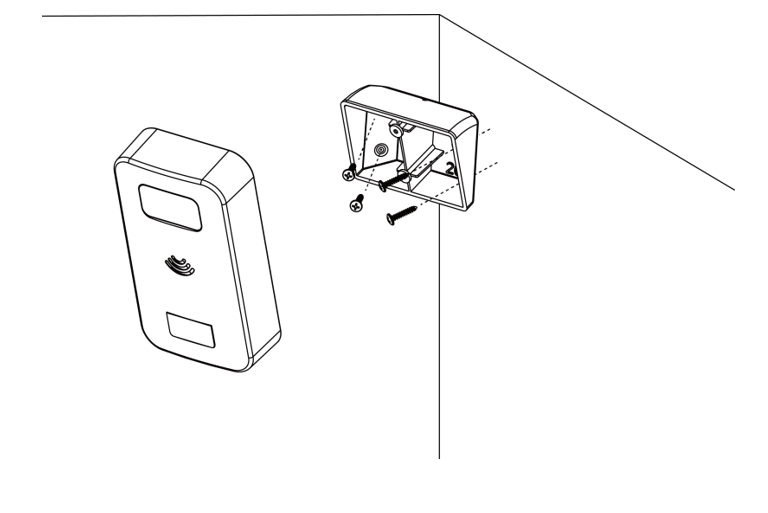
* The fall detection sensor is designed to be mounted in a corner with the fixing screws and wall plugs provided.
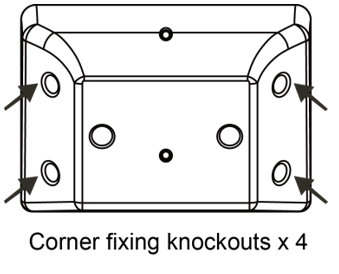
* The provided mounting bracket has 4 knockouts, where the plastic is thinner and can be broken for mounting purpose.
* To mount fall detection sensor with the mounting bracket:
1\) Break through the four corner knockouts on the mounting bracket.
2\) Use the holes as a template and drill holes into the surface of the corner.
{% hint style="info" %}
Note: Install the mounting bracket at a height of 2 meters (measured from the top of the mounting bracket) above the ground level for best performance.
{% endhint %}
3\) Push in the wall plugs and screw the mounting bracket on the wall with the screws.
4\) Mount fall detection sensor with the hooks of the mounting bracket latched on the back cover of the fall detection sensor, and then push downwards until you hear a click sound to lock the hook.
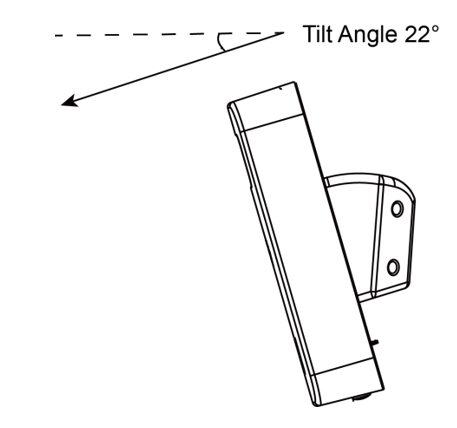
5\) The tilt angle of fall detection sensor should be 22° when it is well mounted.
## Installation Recommendations
It is recommended to install the Fall Detection Sensor in the following locations:
* Please install in the corner at 2 meters (measured from the top of the mounting bracket) above ground level for best performance.
* The tilt angle of fall detection sensor should be 22°
* The operating temperature is 0° to 45°C.
* The fall detection sensor has a detection area of 5M x 5M when mounted 2m above ground.
Limitations:
* Do not install the fall detection sensor in the corner where its field of view will be obstructed by, e.g., curtains, ornaments, or an opened door, etc.
* Do not expose the fall detection sensor completely to direct sunlight.
* Avoid large obstacles in the detection area.
* Do not install the fall detection sensor next to or towards heat sources, such as fires and boilers.
* Keep away from air outlet, such as air conditioning vents.
* Never attempt to disassemble or modify the unit.