> For the complete documentation index, see [llms.txt](https://vesta-guide.gitbook.io/vesta-guide/llms.txt). Markdown versions of documentation pages are available by appending `.md` to page URLs; this page is available as [Markdown](https://vesta-guide.gitbook.io/vesta-guide/svenska/vesta-156n.md).

# VESTA-156N

Konfigurationsmanual för VESTA-156N

<figure><img src="/files/1eb72652adec515afba610968631ec746d1fe109" alt=""><figcaption></figcaption></figure>

## FÖRST OCH FRÄMST:

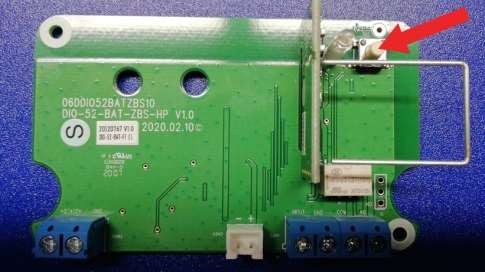
### • Anslut batteriet till I/O-modulen

![](/files/c946fa337edcb3ef80636548552ae5d73e54ebde)

{% hint style="danger" %}
OBS:

### Anslut rökgeneratorn till terminalerna "smoke" först EFTER att driftstester har genomförts.

{% endhint %}

## Inlärning av I/O-modul på panelen

1. Aktivera inlärningsfunktionen på panelen (för mer information, se panelmanualen)

![Lägg till enhet](/files/747a99ee0b5ea3b43a343b7af7ee73720773092a)

![Välj Övriga](/files/b80d8873795349766cefc35c6bdec1f1591702f7)

2. Tryck på knappen på I/O-modulen installerad inuti VESTA-156

<figure><img src="/files/32f3eddb1e6ee3b2cc937a4a5dc12ddbf66bf21b" alt=""><figcaption></figcaption></figure>

3. Välj den upptäckta enheten och tryck OK

![](/files/d38b58dea9956f4c46b7fbe53f6a1d9289b3364a)

4. Tilldela lämpligt område till utgångsenheten (DO), och välj zonnummer och enhetens namn: RÖKAKTIVERING

![](/files/5a179612bcdc69b5c71f619dacc4ffaf27fdfeb8)

{% hint style="warning" %}
Notera: Utgångsmodulen (DO) måste vara inställd som "Separata enheter"
{% endhint %}

5. Tilldela vid ingången (DI) samma område som utgångsenheten (DO) och välj zonnummer och enhetens namn: RÖKSABOTAGE.

![](/files/a23544b519989c2384aaa85be9d76edc33a3e6ab)

6. Ställ in ingångsmodulen som en 24H inbrottslarm

## Aktivering av konfigurationsregel

I menyn "automationsregel" skapa en ny regel enligt nedan:

![](/files/8012c1cc82c949a2963ed2458104d6a9927f50db)

## Konfiguration för dubbel överensstämmelse

I enhetsinställningarna, ange minst 2 enheter med attributet "Cross zone" för att aktivera rökgeneratorn ENDAST vid aktivering av båda enheterna inom en programmerbar tid och därigenom undvika felaktiga aktiveringar.

Exempel på Cross Zone-programmering:

![PIRCAM-zon ](/files/d4ce89354301ac6503da94bc5df64576d7001fc2)

![Magnetkontakt-zon](/files/2c24c0f3f5fd58ad2bf05ff38827645a9db16490)

I menyn "Säkerhet", ställ in timern för cross-zoner till 1 minut eller mer (tiden inom vilken de 2 zonerna måste aktiveras för att utlösa rökgeneratorn)

![](/files/3fdda5913f6981adf1e6a562ffad50f39ef22be3)


---

# Agent Instructions
This documentation is published with GitBook. GitBook is the documentation platform designed so that both humans and AI agents can read, navigate, and reason over technical content effectively. Learn more at gitbook.com.

## Querying This Documentation
If you need additional information that is not directly available in this page, you can query the documentation dynamically by asking a question.

Perform an HTTP GET request on the current page URL with the `ask` query parameter, and the optional `goal` query parameter:

```
GET https://vesta-guide.gitbook.io/vesta-guide/svenska/vesta-156n.md?ask=<question>&goal=<endgoal>
```

`ask` is the immediate question: it should be specific, self-contained, and written in natural language.
`goal` is optional and describes the broader end goal you are ultimately trying to accomplish on behalf of the user. GitBook uses it to tailor the answer towards what is most useful for that goal.

The response will contain a direct answer to the question and relevant excerpts and sources from the documentation.

Use this mechanism when the answer is not explicitly present in the current page, you need clarification or additional context, or you want to retrieve related documentation sections.