> For the complete documentation index, see [llms.txt](https://vesta-guide.gitbook.io/vesta-guide/llms.txt). Markdown versions of documentation pages are available by appending `.md` to page URLs; this page is available as [Markdown](https://vesta-guide.gitbook.io/vesta-guide/portuguese-pt/vesta-341n.md).
# VESTA-341N
STCB-1-LTE-E F1 868
## Ponto de chamada de emergência por voz
### TABELA DE COMANDOS SMS
### GUIA RÁPIDO
{% stepper %}
{% step %}
Envie SMS para o VCP com o número de telefone que deseja chamar
RPT:PROG,1111,3,TELEFONE,3,0,0,4
{% endstep %}
{% step %}
Adicionar ao painel VESTA (Apenas VESTA-349N)
Coloque o painel em modo de aprendizado e pressione o botão de ajuda no VESTA-349N
{% endstep %}
{% endstepper %}
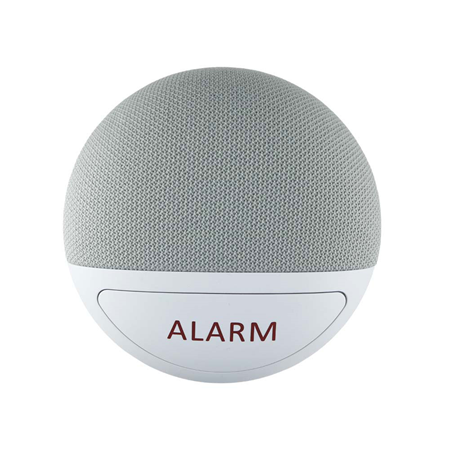
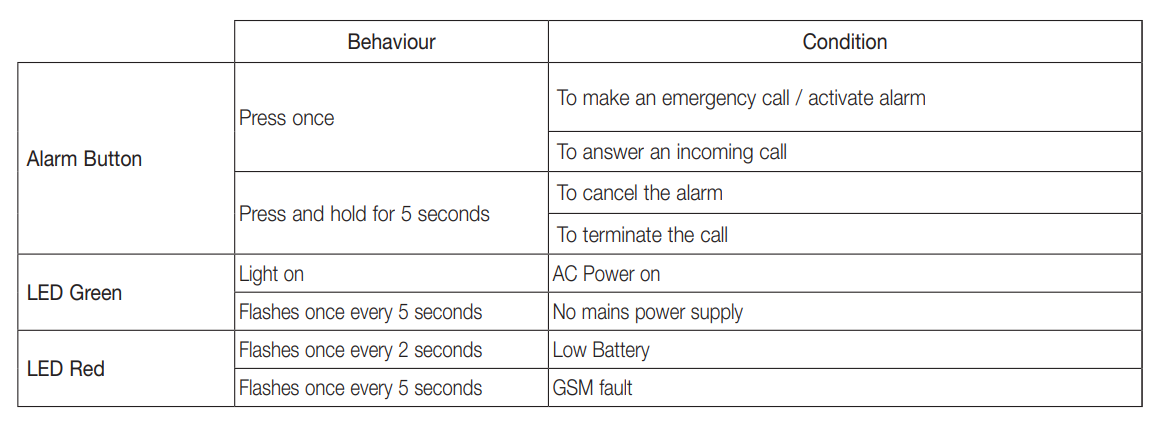
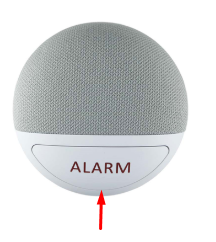
### Botão do dispositivo e indicador LED
***
{% hint style="info" %}
## **Manual para Aprender e Remover Dispositivos RF no VESTA-341N**
### **Entrando no Modo de Aprendizado**
1. Pressione e segure o **Botão de Alarme** no VCPP por **8 segundos**.
2. No **8º segundo**, o dispositivo emitirá **um bip**.
3. Solte o botão imediatamente após o bip para entrar no **modo de aprendizado**.
***
### **Aprendizado e Teste do Dispositivo**
1. **Pressione o Botão** no dispositivo RF para transmitir sinais. *(Consulte o manual do dispositivo RF para detalhes específicos.)*
2. **O VCP emitirá 2 bips** quando receber com sucesso o sinal do dispositivo RF (pulseira/pingente), confirmando que foi aprendido.
3. **Repita os Passos 1-2** para aprender dispositivos adicionais.
4. **Verificação:**
* Para garantir a recepção correta em todos os locais principais, verifique se a **unidade mãos-livres emite um tom de confirmação** ao pressionar o **botão da pulseira/pingente**.
5. Uma vez que todos os dispositivos sejam aprendidos, **pressione o Botão de Alarme** no **VCP uma vez** para sair do modo de aprendizado.
* O dispositivo emitirá **2 bips** para confirmar a saída.
***
### **Remoção do Dispositivo**
1. Enquanto em **modo de aprendizado** , pressione o **Botão de Alarme duas vezes rapidamente**.
2. **O VCP emitirá 2 bips**, indicando que **TODOS os dispositivos RF** foram removidos.
3. O dispositivo automaticamente **sairá do modo de aprendizado** após a remoção.
{% endhint %}

 ***
### **Aprendizado e Teste do Dispositivo**
1. **Pressione o Botão** no dispositivo RF para transmitir sinais. *(Consulte o manual do dispositivo RF para detalhes específicos.)*
2. **O VCP emitirá 2 bips** quando receber com sucesso o sinal do dispositivo RF (pulseira/pingente), confirmando que foi aprendido.
3. **Repita os Passos 1-2** para aprender dispositivos adicionais.
4. **Verificação:**
* Para garantir a recepção correta em todos os locais principais, verifique se a **unidade mãos-livres emite um tom de confirmação** ao pressionar o **botão da pulseira/pingente**.
5. Uma vez que todos os dispositivos sejam aprendidos, **pressione o Botão de Alarme** no **VCP uma vez** para sair do modo de aprendizado.
* O dispositivo emitirá **2 bips** para confirmar a saída.
***
### **Remoção do Dispositivo**
1. Enquanto em **modo de aprendizado** , pressione o **Botão de Alarme duas vezes rapidamente**.
2. **O VCP emitirá 2 bips**, indicando que **TODOS os dispositivos RF** foram removidos.
3. O dispositivo automaticamente **sairá do modo de aprendizado** após a remoção.
{% endhint %}
***
### **Aprendizado e Teste do Dispositivo**
1. **Pressione o Botão** no dispositivo RF para transmitir sinais. *(Consulte o manual do dispositivo RF para detalhes específicos.)*
2. **O VCP emitirá 2 bips** quando receber com sucesso o sinal do dispositivo RF (pulseira/pingente), confirmando que foi aprendido.
3. **Repita os Passos 1-2** para aprender dispositivos adicionais.
4. **Verificação:**
* Para garantir a recepção correta em todos os locais principais, verifique se a **unidade mãos-livres emite um tom de confirmação** ao pressionar o **botão da pulseira/pingente**.
5. Uma vez que todos os dispositivos sejam aprendidos, **pressione o Botão de Alarme** no **VCP uma vez** para sair do modo de aprendizado.
* O dispositivo emitirá **2 bips** para confirmar a saída.
***
### **Remoção do Dispositivo**
1. Enquanto em **modo de aprendizado** , pressione o **Botão de Alarme duas vezes rapidamente**.
2. **O VCP emitirá 2 bips**, indicando que **TODOS os dispositivos RF** foram removidos.
3. O dispositivo automaticamente **sairá do modo de aprendizado** após a remoção.
{% endhint %}