> For the complete documentation index, see [llms.txt](https://vesta-guide.gitbook.io/vesta-guide/llms.txt). Markdown versions of documentation pages are available by appending `.md` to page URLs; this page is available as [Markdown](https://vesta-guide.gitbook.io/vesta-guide/arabic-ar/vesta-434.md).

# VESTA-434

## مقدمة

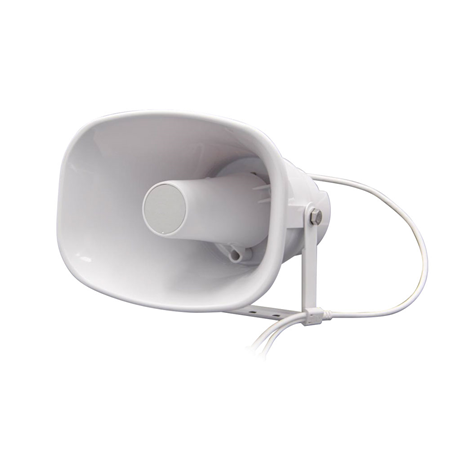
سيشرح هذا الدليل كيفية عمل تكامل مكبر الصوت مع VESTA. ستتعلم عن عملية الإعداد والميزات الرئيسية وكيفية تعظيم فعالية هذا التكامل.

<figure><img src="/files/ecd83ca1e47a50b46c456ccf9f7ddbb9355a9a37" alt=""><figcaption></figcaption></figure>

## 🔐 الوصول المحلي

فيما يلي بيانات الوصول المحلية إلى المكبر:

<table data-header-hidden><thead><tr><th width="350"></th><th></th></tr></thead><tbody><tr><td>عنوان IP الافتراضي</td><td>192.168.5.200</td></tr><tr><td>اسم المستخدم الافتراضي</td><td>admin</td></tr><tr><td>كلمة المرور الافتراضية</td><td>admin</td></tr></tbody></table>

## تحميل ملف صوتي جديد

<figure><img src="/files/aeb62ad7eb9fd510dafba4949db661bcf5d17fe4" alt=""><figcaption><p>لتحميل ملف mp3 جديد</p></figcaption></figure>

{% hint style="info" %}
تذكر تمكين في ALARM -> HTTP URL (تمكين تشغيل الملف)
{% endhint %}

<figure><img src="/files/86856a76b6284df13dc66b6aecef849f5303ad26" alt=""><figcaption></figcaption></figure>

## 📢 أوامر HTTP لتشغيل المقاطع الصوتية في VESTA

### 🔊 **أمثلة على إجراء تشغيل API**

**إجراء الإيقاف:**&#x20;

* <http://192.168.0.155/api/play?action=stop>

**بدء تشغيل bell1:**&#x20;

* <http://192.168.0.155/api/play?action=start\\&file=bell1>

**بدء تشغيل userfile1 مرة واحدة بصوت 10**:&#x20;

* <http://192.168.0.155/api/play?action=start\\&file=userfile1\\&mode=once\\&volume=10>

**بدء تشغيل userfile1 عدة مرات (10 مرات) بصوت 20:**

* <http://192.168.0.155/api/play?action=start\\&file=userfile1\\&mode=multiple\\&count=10\\&volume=20>

**بدء تشغيل userfile1 لمدة محددة (10 مرات) بصوت 30:**&#x20;

* <http://192.168.0.155/api/play?action=start\\&file=userfile1\\&mode=duration\\&count=10\\&volume=30>

## تنشيط وِجِه صوتي من VESTA

{% hint style="success" %}
هذه **HTTP** الأوامر يمكن إدخالها مباشرة في إجراءات قواعد VESTA. على سبيل المثال، يمكننا برمجة قاعدة أنه في حالة الإنذار سيتم تشغيل الوتد الصوتي 1 على المكبر: نقوم بإنشاء قاعدة بالمحتوى التالي:&#x20;

* ***المُحفِز:** إنذار -> أي إنذار*&#x20;
* ***الشروط:** لا*&#x20;
* ***الإجراءات:** HTTP ->* <http://192.168.0.155/api/play?action=start\\&file=><mark style="color:أحمر;">userfile1</mark>
  * *<mark style="color:أحمر;">userfile1</mark>*: هذا هو ملف mp3 الأول الذي قمنا بتحميله على المكبر
    {% endhint %}

<figure><img src="/files/a7bc04967619dc64b4bb2785301ce11361e3ce8b" alt=""><figcaption><p>مثال على قاعدة في VESTA</p></figcaption></figure>

***

## تحميل الدليل الكامل

{% file src="/files/2fdf3245cf5e4a6cb0fa844d248148a991241e6f" %}


---

# Agent Instructions
This documentation is published with GitBook. GitBook is the documentation platform designed so that both humans and AI agents can read, navigate, and reason over technical content effectively. Learn more at gitbook.com.

## Querying This Documentation
If you need additional information that is not directly available in this page, you can query the documentation dynamically by asking a question.

Perform an HTTP GET request on the current page URL with the `ask` query parameter, and the optional `goal` query parameter:

```
GET https://vesta-guide.gitbook.io/vesta-guide/arabic-ar/vesta-434.md?ask=<question>&goal=<endgoal>
```

`ask` is the immediate question: it should be specific, self-contained, and written in natural language.
`goal` is optional and describes the broader end goal you are ultimately trying to accomplish on behalf of the user. GitBook uses it to tailor the answer towards what is most useful for that goal.

The response will contain a direct answer to the question and relevant excerpts and sources from the documentation.

Use this mechanism when the answer is not explicitly present in the current page, you need clarification or additional context, or you want to retrieve related documentation sections.