> For the complete documentation index, see [llms.txt](https://vesta-guide.gitbook.io/vesta-guide/llms.txt). Markdown versions of documentation pages are available by appending `.md` to page URLs; this page is available as [Markdown](https://vesta-guide.gitbook.io/vesta-guide/arabic-ar/vesta-156n.md).

# VESTA-156N

دليل إعدادات جهاز VESTA-156N

<figure><img src="/files/e47d9235ea21d72f32e0e7195a28b7a9d028250b" alt=""><figcaption></figcaption></figure>

## أولاً:

### • قم بتوصيل بطارية وحدة الإدخال/الإخراج

![](/files/7fdce411ae5280bb2cbe4dde75ba3df1e1675c92)

{% hint style="danger" %}
ملاحظة:

### قم بتوصيل مولد الدخان في أطراف «الدخان» فقط بعد إجراء اختبارات التشغيل.

{% endhint %}

## تعليم وحدة الإدخال/الإخراج على اللوحة

1. فعّل وظيفة التعلم على اللوحة (لمزيد من المعلومات، راجع كتيب اللوحة)

![إضافة جهاز](/files/d734be7e2645e575d3c98c396549f41d68a197b1)

![اختر أخرى](/files/c39d7411085cf9ce72ee6c6504fe27c203477629)

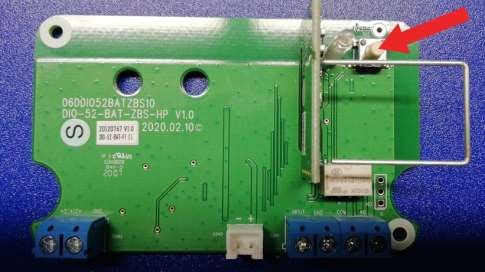
2. اضغط الزر على وحدة الإدخال/الإخراج المثبتة داخل VESTA-156

<figure><img src="/files/9a48e2959e5b83b5f1d36b4d1410c84f11577a1e" alt=""><figcaption></figcaption></figure>

3. اختر الجهاز المكتشف واضغط موافق

![](/files/1f981dfa7324bcf58e0f08278865c454c876b742)

4. خصّص المنطقة المناسبة لجهاز الإخراج (DO)، واختر رقم المنطقة واسم الجهاز: تفعيل الدخان

![](/files/8bf9a4577850e41196882d0af43c95556d23aa0f)

{% hint style="warning" %}
ملاحظة: يجب ضبط وحدة الإخراج (DO) كـ «أجهزة منفصلة».
{% endhint %}

5. قم بتخصيص نفس المنطقة في المدخل (DI) لجهاز الإخراج (DO) واختر رقم المنطقة واسم الجهاز: العبث بالدخان.

![](/files/ccb2f40afb5890ee5f626b56d97394f3992d6cb8)

6. اضبط وحدة الإدخال كإنذار اقتحام يعمل 24 ساعة

## قاعدة تفعيل التكوين

في قائمة «قاعدة الأتمتة» أنشئ قاعدة جديدة كما هو موضح أدناه:

![](/files/1c0247839f19dcf404aa14de53e509327164562e)

## تكوين المطابقة المزدوجة

في إعدادات الجهاز، اضبط ما لا يقل عن جهازين بميزة «المنطقة المتقاطعة» لتفعيل مولد الدخان فقط في حالة تنشيط كلا الجهازين خلال وقت قابل للبرمجة وبذلك تجنب التنبيهات غير الصحيحة.

مثال لبرمجة المنطقة المتقاطعة:

![منطقة كاميرا الكشف PIR ](/files/ec5d83e448964e16e521d06859eabb0056cfb90b)

![منطقة التماس المغناطيسي](/files/46b267b7f4db270716c200895a6dc91f7b6752e2)

في قائمة «الأمن»، اضبط المؤقت للمناطق المتقاطعة على دقيقة واحدة أو أكثر (المدة التي يجب أن تُفعّل خلالها المنطقتان لتشغيل مولد الدخان)

![](/files/ba2960f9ac6f621185436d22dca0e6b914043cb8)


---

# Agent Instructions
This documentation is published with GitBook. GitBook is the documentation platform designed so that both humans and AI agents can read, navigate, and reason over technical content effectively. Learn more at gitbook.com.

## Querying This Documentation
If you need additional information that is not directly available in this page, you can query the documentation dynamically by asking a question.

Perform an HTTP GET request on the current page URL with the `ask` query parameter, and the optional `goal` query parameter:

```
GET https://vesta-guide.gitbook.io/vesta-guide/arabic-ar/vesta-156n.md?ask=<question>&goal=<endgoal>
```

`ask` is the immediate question: it should be specific, self-contained, and written in natural language.
`goal` is optional and describes the broader end goal you are ultimately trying to accomplish on behalf of the user. GitBook uses it to tailor the answer towards what is most useful for that goal.

The response will contain a direct answer to the question and relevant excerpts and sources from the documentation.

Use this mechanism when the answer is not explicitly present in the current page, you need clarification or additional context, or you want to retrieve related documentation sections.